![Logo.svg]](https://info.luca-app.de/hubfs/Logo.svg)
Payments processed via luca Pay are subject to transaction-based service fees. For accurate reconciliation, it is important to distinguish between transaction overviews, payouts and the monthly fee invoice.
Fees in the transaction overview
The transaction overview shows the fees charged for individual payments. These fees are displayed as net amounts.
In addition, separate entries such as adjustments or tax-related items may appear under “Other transactions”. These items are not necessarily additional service fees.
Monthly fee invoice
The monthly invoice shows the luca Pay service fees charged for the respective billing period.
The invoice distinguishes between:
- percentage-based fees
- fixed fees, where applicable
- VAT (19%)
- total invoice amount including VAT
Why can daily and monthly statements differ?
The fees shown in individual transaction overviews cannot always simply be added up and directly compared with the total amount on the monthly invoice.
Possible reasons include different billing periods, different booking dates, as well as subsequent adjustments or corrections. Tax-related items may also be recorded separately in the transaction overviews.
In particular, entries under “Other transactions” may affect the payout amount without representing an additional service fee.
VAT and input tax
VAT may apply to luca Pay service fees. A VAT-registered business may generally be able to claim the VAT shown on the invoice as input tax, provided the applicable legal requirements are met.
If necessary, the specific tax treatment should be clarified with your tax advisor or the relevant tax authority.
Which statement should be used for accounting?
For reconciliation with the actual payout amount, we recommend using the transaction overview corresponding to the respective payout period available in the luca Locations account.
How to find it:
luca Locations → Payouts → select the relevant billing period → Download icon
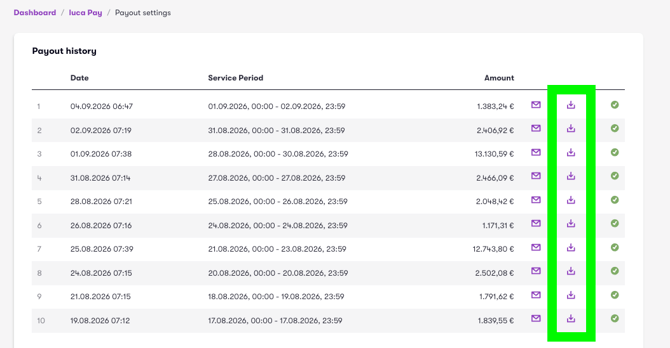
The transaction overview downloaded there is aligned with the respective payout period and payout amount. It is therefore more suitable for accounting reconciliation than simply adding up the daily transaction overviews automatically sent by email.